What is a Unified Calendar API?

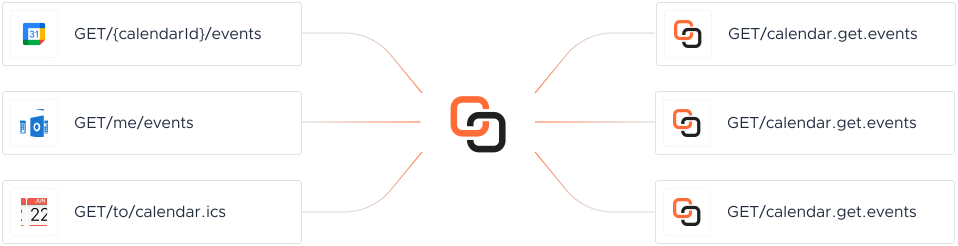
Calendar platforms each store data differently, with their own authentication and schemas. A Unified Calendar API standardizes these into one interface — operations like Create Calendar, Update Event, Update Calendar work the same way no matter which platform is on the other end, while Knit manages translation, rate limiting, retries, and sync management underneath.

Calendar API Operations

Every operation below is real and already live — not a roadmap item. Browse the full API reference →

Create Calendar

Create a new calendar under a user's account

Update Event

Update an existing event's time, participants, or metadata

Update Calendar

Modify name, timezone, or description of an existing calendar

Send RSVP

Submit attendee response to an event invite

Move Event

Move an event from one calendar to another

List Event Instances

Retrieve all occurrences of a recurring event

List All Events

Fetch all events for a calendar within a date range

List All Calendars

Retrieve all calendars owned or shared with a user

Get Single Event

Fetch full details of a specific calendar event

Get Single Calendar

Fetch metadata of a specific calendar by ID

Get Free/Busy Slots

Retrieve free or busy time blocks for one or more calendars

Get Availability

Find common available time across multiple users

Create Event

Create a new event with attendees and conferencing details

Missing an operation?

Our AI Agent builds it instantly.

Try Now

Enterprise-grade security

SOC 2 certified GDPR compliant ISO 27001 certified
Visit our Security Center Review the DPA

Why Knit for Calendar integrations

Extensive webhook support

Real-time sync without constant polling — get notified the moment Calendar data changes.

Scalable infra

Sync thousands of Calendar records in minutes, not hours.

Add a missing app in days

AI-powered connector building means a missing Calendar platform isn't a months-long wait.

Unified Calendar API vs. building it yourself

Building it yourself

  • A separate integration for every Calendar platform you support
  • Different schema, auth, and pagination per platform
  • You build and maintain OAuth for each platform
  • Poll each API on your own schedule
  • Engineering effort grows with every new platform
  • Weeks to months per platform, per engineer

With Knit

  • One Unified Calendar API covers every platform you support
  • One normalized schema across every platform
  • Embedded Auth handles OAuth, storage, and refresh for you
  • Extensive webhook support for real-time sync
  • Describe a missing app to the Integrations Agent and get it built instantly
  • Live in days, not months

Customer Stories

See how leading technology firms are scaling their operations

Amazing Product With Exceptional Support from the team. By using Knit we managed to speed up our development by orders of magnitude.
H
Huynh H
Developer, Multiplier
A brilliant tool to let you seamlessly integrate with many different systems. It is very easy to integrate with and customer support is next level.
J
Jayesh
Co-Founder, Scrut
Seamless integration experience. Well-documented, self-explanatory APIs, and excellent service and support.
P
Poorvi
Product Manager, Onsurity
Easy to integrate. Knit's dashboard is intuitive for setting up and testing integrations, and the sandbox is extremely useful during development.
A
Aditya
Product Lead, RazorpayXPayroll
Knit shipped a brand-new Timesheet API in a week and handed us a ready-to-use NetSuite sandbox. That velocity is priceless when you're running payroll in 40+ countries.
R
Rohit Singh
GM, Payoneer Workforce Management

#1 in Ease of Integrations

4.9 out of 5 stars

4.9 out of 5 stars on G2

G2 Leader, Spring 2026G2 Fastest Implementation, Spring 2026G2 High Performer, Spring 2026G2 Best Est. ROI, Spring 2026
FAQ

Common questions about the Unified Calendar API

Which Calendar systems does Knit support?

4 Calendar platforms today — including Google Calendar, iCalendar, Outlook Calendar and more. Missing one you need? Knit's AI-assisted connector-build process typically adds a new one within days.

Does the Unified Calendar API support both reading and writing data?

Yes. It supports both reads and writes, so you can build bi-directional sync use cases — not just pull Calendar data, but push updates back to the source app.

How does authentication work across Calendar platforms?

Knit provides an embedded Auth component (white-labeling available on higher tiers) that handles OAuth, credential storage, and refresh — your customers authorize once through Knit, and you never touch raw credentials.

What is the timeline for adding a missing Calendar connector?

Typically days, not months — the same AI-based connector-build tooling that lets us maintain the 4 Calendar connectors already live.

Do you store Calendar data or customer PII?

No. Knit acts as a stateless passthrough — data is processed on our application server and sent directly to your webhooks, without being stored on Knit's servers.

What is the pricing model, and is there a free trial?

You choose the model that fits your business — pricing based on integrated accounts, or based on API call volume. Every plan includes a 30-day free trial before billing starts.

See all FAQs

From the blog

State of SaaS Integration: 2025 Outlook

State of SaaS Integration: 2025 Outlook

In this whitepaper, we discuss all about SaaS integrations: types, trends, forecast and examples. Read on to explore and understand the SaaS integration market

Put Integrations on Autopilot. Talk to Experts.

Knit is loved by customers across the globe due to our seamless product and white glove support. You'll love us too!

Talk to a Human