








Full list of Knit’s CRM API Guides
This directory is a live list of all CRM API integration guides we have written at Knit. Use it to quickly find the guide related to the specific CRM APP you want to learn more about.
Real, already-built CRM MCP Servers — give your AI agent access to every CRM platform Knit supports.
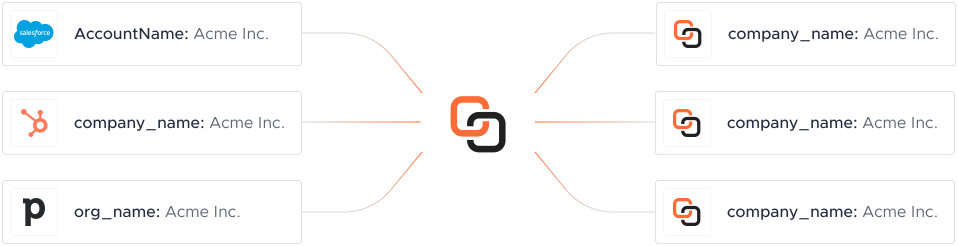
Each CRM platform exposes its own API, auth, and schema. A Knit MCP Server wraps that platform's real actions as AI-ready tools your agent can call directly — actions like Create CRM Account, Create CRM Contact, Create CRM Custom Object Record work the same way no matter which platform your agent is connected to, while Knit manages hosting, auth, and tool exposure underneath.
Every action below is real and already live — not a roadmap item. Browse the full API reference →
The Create CRM Account API allows users to create a new account in the CRM system. It requires a POST request to the endpoint https://api.getknit.dev/v1.0/crm.account.create with headers specifying 'accept' and 'content-type' as 'application/json'. The request body must include the account's name and owner details, and can optionally include additional information such as description, industry, website, number of employees, address, phone number, and custom fields. The response will indicate success and provide the ID of the created account, or an error message if the request fails.
The Create CRM Contact API allows users to create a new contact in the CRM system. The API requires a POST request to the specified endpoint with headers specifying 'accept' and 'content-type' as 'application/json'. The request body must include the contact's first name, last name, email, and owner information. Optional fields include industry, job title, address, phone number, account ID, and custom fields. The response will indicate success with the ID of the created contact or provide an error message if the operation fails.
This API endpoint allows the creation of a CRM custom object record. It requires a POST request to the specified URL with headers 'accept' and 'content-type' set to 'application/json'. The request body must include 'schemaId', 'name', 'description', 'fields', and 'metadata'. The response will indicate success with a 'recordId' if successful, or an error message if not.
This API endpoint allows the creation of a custom object schema in the CRM system. It requires a POST request to the specified URL with headers 'accept' and 'content-type' set to 'application/json'. The request body must include the schemaId, title, titlePluralized, description, fields, and metadata. The response will indicate success with a boolean and return the schemaId if successful. In case of an error, a descriptive error message will be provided.
The Create CRM Deal API allows users to create a new deal in the CRM system. The API requires a POST request to the endpoint https://api.getknit.dev/v1.0/crm.deal.create with headers specifying 'accept' and 'content-type' as 'application/json'. The request body must include the 'name', 'owner', and 'stageId' fields, along with optional fields such as 'description', 'amount', 'currency', 'pipelineId', 'account', 'contact', and 'customFields'. The response will indicate success with a boolean and provide the ID of the created deal. In case of an error, a descriptive error message will be returned.
The Create CRM Engagement API allows users to create a new engagement in the CRM system. The API requires a POST request to the endpoint with headers specifying 'accept' and 'content-type' as 'application/json'. The request body must include details such as the type of engagement (CALL, MEETING, EMAIL, etc.), subject, direction (INBOUND or OUTBOUND), content, owner details (id and email), start and end date-time, channel for communication, custom fields, and metadata. The response will indicate success with a boolean and may include data or an error message if the request fails.
The Create CRM Lead API allows users to create a new lead in the CRM system. The API requires a POST request to the specified endpoint with headers specifying 'accept' and 'content-type' as 'application/json'. The request body should include details about the lead such as first name, last name, job title, company, description, owner information, industry, number of employees, and address details. The response will indicate success or failure of the operation, with a success flag and optional data or error message.
This API endpoint allows the creation of a custom object field in the CRM system. It requires a POST request to the specified URL with headers 'accept' and 'content-type' set to 'application/json'. The request body must include 'schemaId', 'fieldId', 'title', and 'type' as required fields, with 'metadata' being optional. The response will indicate success with the 'success' field and return the 'schemaId' and 'fieldId' in the 'data' object. In case of an error, the 'success' field will be false, and an 'error' object will provide a descriptive message.
The Delete CRM Account API allows users to delete a CRM account by providing the account ID. The request is made using the POST method to the endpoint https://api.getknit.dev/v1.0/crm.account.delete. The request headers must include 'accept' and 'content-type' both set to 'application/json'. The request body must contain the 'accountId' of the account to be deleted. On success, the API returns a response with 'success' set to true and 'data' as null. If there is an error, 'success' is false and an 'error' object with a descriptive message is returned.
The Delete CRM Contact API allows users to delete a contact from the CRM system. It requires a POST request to the endpoint with a JSON body containing the 'contactId' of the contact to be deleted. The request headers must include 'accept' and 'content-type' set to 'application/json'. On success, the API returns a JSON response with 'success' set to true and 'data' as null. If an error occurs, 'success' is false and an 'error' object with a descriptive message is returned.
This API endpoint is used to delete a field from a custom object in the CRM. It requires a POST request to the specified URL with headers specifying 'accept' and 'content-type' as 'application/json'. The request body must include 'schemaId' and 'fieldId' to identify the field to be deleted. On success, it returns a response with 'success' set to true and 'data' as null. If there is an error, 'success' is false and an 'error' object with a descriptive message is returned.
This API endpoint deletes a record from a custom object in the CRM. It requires the schema ID and record ID as input in the request body. The response indicates whether the operation was successful. If successful, the response contains a success flag and null data. If unsuccessful, it contains an error message.
This API endpoint deletes a CRM custom object schema identified by the provided schemaId. It requires the schemaId to be specified in the request body. The request must include headers specifying 'accept' and 'content-type' as 'application/json'. On success, it returns a response with 'success' set to true and 'data' as null. If an error occurs, 'success' is false and an 'error' object with a descriptive message is returned.
The Delete CRM Deal API allows users to delete a specific deal from the CRM system. The request requires the 'dealId' in the request body to identify which deal to delete. The request headers must include 'accept' and 'content-type' set to 'application/json'. A successful response will return a 'success' boolean set to true and 'data' as null. If the operation fails, 'success' will be false and an 'error' object with a descriptive message will be provided.
The Delete CRM Engagement API allows users to delete a specific engagement from the CRM system. The API requires a POST request to the endpoint with headers specifying 'accept' and 'content-type' as 'application/json'. The request body must include 'engagementId' and 'type' as required fields. On success, the API returns a response with 'success' set to true and 'data' as null. In case of an error, 'success' is false and an 'error' object with a descriptive message is returned.
The Delete CRM Lead API allows users to delete a lead from the CRM system. It requires a POST request to the endpoint with the leadId in the request body. The request headers must include 'accept' and 'content-type' set to 'application/json'. On success, it returns a response with 'success' set to true and 'data' as null. If there is an error, 'success' is false and an 'error' object with a descriptive message is returned.
This API endpoint retrieves the fields of a custom object in a CRM system. It requires the schema ID as input in the request body. The response includes a success flag and a list of fields with details such as field ID, title, type, creation and update timestamps, description, and the IDs of the user who created and last updated the field. In case of an error, an error message is returned.
This API endpoint retrieves the schemas of custom objects in the CRM. It requires an 'accept' header with the value 'application/json'. The response includes a success flag and a data object containing an array of schema objects. Each schema object includes details such as schemaId, createdAt, updatedAt, title, titlePluralized, description, createdById, and updatedById. In case of an error, the response includes a success flag set to false and an error object with a descriptive message.
The Get CRM Deal Stages API retrieves the stages of deals in a CRM system. It requires an 'accept' header specifying 'application/json'. The response includes a success flag and data containing an array of stages, each with a stageId, stageName, pipelineId, and pipelineName. In case of an error, an error message is provided.
The List CRM Fields API allows users to retrieve a list of fields for a specified CRM object type. The API requires a query parameter 'object' to specify the CRM object type such as 'account', 'contact', 'deal', 'lead', or 'engagement'. An optional 'subType' parameter can be used for CRMs where the engagement object is made up of sub-objects. The response includes a success flag and data containing mapped and unmapped fields with their IDs and labels.
The List CRM Users API endpoint retrieves a list of users from the CRM system. It requires an 'accept' header specifying 'application/json'. The response includes a 'success' boolean indicating the request status, and if successful, a 'data' object containing an array of 'users', each with 'email' and 'id'. If unsuccessful, an 'error' object with a 'msg' is returned.
The Update CRM Account API allows users to update details of an existing CRM account. The API requires a POST request to the specified endpoint with headers indicating the content type as application/json. The request body must include the accountId and owner details, and can optionally include other account details such as name, description, industry, website, number of employees, address, phone number, and custom fields. The response will indicate success or failure of the operation, with a success flag and optional data or error message.
The Update CRM Contact API allows users to update the details of an existing contact in the CRM system. The API requires a POST request to the specified endpoint with headers indicating the content type as application/json. The request body must include the contactId of the contact to be updated, and can optionally include other fields such as firstName, lastName, email, industry, jobTitle, owner details, address, phoneNumber, account ID, and custom fields. The response will indicate success or failure of the operation, with a success flag and optional data or error message.
This API endpoint allows updating fields of custom objects in a CRM system. It requires a POST request to the specified URL with headers 'accept' and 'content-type' set to 'application/json'. The request body must include 'schemaId', 'fieldId', 'title', and 'type' to specify the field to be updated and its new attributes. The response will indicate success with a boolean 'success' field and may include additional data or error information.
This API endpoint updates a CRM custom object record. It requires a POST request to the specified URL with headers 'accept' and 'content-type' set to 'application/json'. The request body must include 'schemaId', 'recordId', 'name', 'description', 'fields', and 'metadata'. The response will indicate success or failure, with an optional error message if the operation fails.
The Update CRM Custom Objects Schema API allows users to update the schema of custom objects in the CRM system. The request requires headers specifying the content type as 'application/json'. The request body must include 'schemaId', 'title', 'titlePluralized', and 'description' as required fields. The response will indicate success with a boolean and may include data or an error message if unsuccessful.
The Update CRM Deal API allows users to update the details of an existing deal in the CRM system. The API requires a POST request to the specified endpoint with headers indicating the content type as application/json. The request body must include the 'dealId' as a required field, along with optional fields such as 'name', 'description', 'amount', 'currency', 'owner', 'stageId', 'pipelineId', 'account', 'contact', and 'customFields'. The response will indicate success with a boolean value and may include additional data or an error message if the operation fails.
The Update CRM Engagement API allows users to update details of an existing CRM engagement. The API requires a POST request to the specified endpoint with headers 'accept' and 'content-type' set to 'application/json'. The request body must include the 'engagementId' as a required field, along with optional fields such as 'type', 'subject', 'direction', 'content', 'owner', 'startDateTime', 'endDateTime', and 'channel'. The response will indicate success with a boolean 'success' field and may include an error message if the operation fails.
The Update CRM Lead API allows users to update the details of a lead in the CRM system. The API requires a POST request to the specified endpoint with headers indicating the content type as application/json. The request body must include the leadId, which is mandatory, and can optionally include other details such as firstName, lastName, jobTitle, company, description, owner information, industry, number of employees, and address details. The response will indicate success or failure of the operation, with a success flag and optional data or error message.
Our AI Agent builds it instantly.
Try Now


Deduplicate and cleanse leads, auto-assign leads based on enrichment fields.
Explore this use case


Power AI-driven outreach with real-time CRM data and calendar integrations.
Explore this use case


Knit gives you 100+ prebuilt CRM, ERP, and Ticketing connectors — so you can sell faster and onboard smoother. With…
Explore this use case
Knit's Close CRM MCP Server gives your AI agents instant, code-free access to every Close CRM API endpoint-read, write, and automate without OAuth headaches or custom endpoints.
Knit's Freshworks CRM MCP Server gives your AI agents instant, code-free access to every Freshworks CRM API endpoint-read, write, and automate without OAuth headaches or custom endpoints.
Knit's GoHighLevel CRM MCP Server gives your AI agents instant, code-free access to every GoHighLevel CRM API endpoint-read, write, and automate without OAuth headaches or custom endpoints.
Knit's HubSpot MCP Server gives your AI agents instant, code-free access to every HubSpot API endpoint-read, write, and automate without OAuth headaches or custom endpoints.
Knit's Pipedrive MCP Server gives your AI agents instant, code-free access to every Pipedrive API endpoint-read, write, and automate without OAuth headaches or custom endpoints.
Knit's Pipeline CRM MCP Server gives your AI agents instant, code-free access to every Pipeline CRM API endpoint-read, write, and automate without OAuth headaches or custom endpoints.
Knit's Salesflare MCP Server gives your AI agents instant, code-free access to every Salesflare API endpoint-read, write, and automate without OAuth headaches or custom endpoints.
Knit's Salesforce MCP Server gives your AI agents instant, code-free access to every Salesforce API endpoint-read, write, and automate without OAuth headaches or custom endpoints.
Knit's Zendesk CRM MCP Server gives your AI agents instant, code-free access to every Zendesk CRM API endpoint-read, write, and automate without OAuth headaches or custom endpoints.

Knit's Zoho CRM MCP Server gives your AI agents instant, code-free access to every Zoho CRM API endpoint-read, write, and automate without OAuth headaches or custom endpoints.
Describe it to our AI Integrations Agent and get a working integration instantly — no waiting on our roadmap.
Meet the Integrations AgentEvery CRM MCP Server spins up with zero infrastructure — Knit scales, patches, and monitors it for you.
OAuth, SAML, service accounts — Knit manages credentials and refreshes across every CRM platform.
AI-powered connector building means a missing CRM platform isn't a months-long wait.
See how leading technology firms are scaling their operations
Amazing Product With Exceptional Support from the team. By using Knit we managed to speed up our development by orders of magnitude.
A brilliant tool to let you seamlessly integrate with many different systems. It is very easy to integrate with and customer support is next level.

Seamless integration experience. Well-documented, self-explanatory APIs, and excellent service and support.
Easy to integrate. Knit's dashboard is intuitive for setting up and testing integrations, and the sandbox is extremely useful during development.
Knit shipped a brand-new Timesheet API in a week and handed us a ready-to-use NetSuite sandbox. That velocity is priceless when you're running payroll in 40+ countries.

4.9 out of 5 stars on G2




10 CRM platforms today — including Close CRM, Freshworks, GoHighLevel and more. Missing one you need? Knit's AI-assisted connector-build process typically adds a new one within days.
Yes. Every action can both read and write, so your agent can pull CRM data and push updates back to the source app, not just query it.
Knit manages OAuth, credential storage, and refresh for every CRM platform — your team never wrestles with tokens, and there's nothing to configure per platform.
Typically days, not months — the same AI-based connector-build tooling that lets us maintain the 10 CRM mcp servers already live.
No. Knit acts as a stateless passthrough — data is processed on our application server and returned directly to your agent, without being stored on Knit's servers.
You choose the model that fits your business — pricing based on integrated accounts, or based on API call volume. Every plan includes a 30-day free trial before billing starts.
This directory is a live list of all CRM API integration guides we have written at Knit. Use it to quickly find the guide related to the specific CRM APP you want to learn more about.

Zendesk CRM API integration guide covering key features, endpoints, use cases, FAQs, and best practices to automate customer data, sales pipelines, and support workflows at scale.
Zoho CRM API integration guide covering authentication, bulk read/write, COQL queries, composite requests, backups, and key endpoints. Includes practical highlights and FAQs for building reliable Zoho CRM integrations.